A traditional garage keypad gives you one useful convenience: entering a PIN instead of carrying a remote.
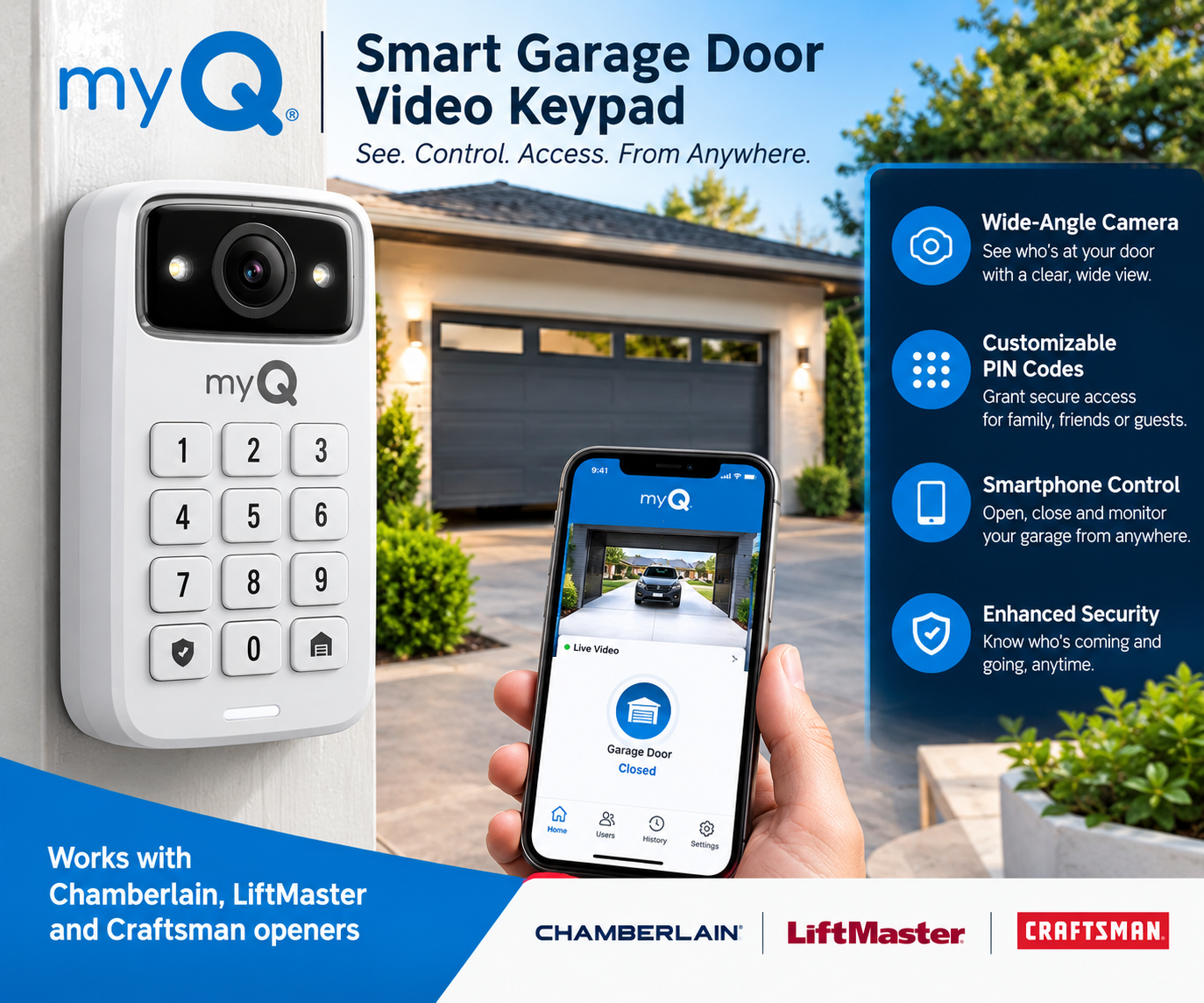
The myQ Smart Garage Video Keypad takes that concept further by combining keypad access with a wide-angle camera, motion detection, smartphone notifications, two-way audio, and smart access management through the myQ app.
That makes it particularly interesting for homeowners who want to know not only who can access the garage, but also what is happening around the garage entrance.
The important question, however, is whether those features make the myQ Video Keypad a good purchase for your particular garage.
This guide covers its features, compatibility, pricing, battery-powered design, subscription considerations, advantages, limitations, alternatives, and the type of homeowner it is best suited for.
Quick Answer: Is the myQ Smart Garage Video Keypad Worth Considering?
Yes, the myQ Smart Garage Video Keypad is worth considering if you already have a compatible Chamberlain, LiftMaster, Craftsman, Raynor, or AccessMaster garage door opener and want keypad access plus video monitoring in one device.
Its strongest features are unique PIN management, a 160-degree wide-angle camera, smartphone notifications, motion detection, night vision, and two-way audio.
However, buyers should pay attention to compatibility, Wi-Fi quality, battery maintenance, and the difference between free live access features and subscription-based video history.
Pricing and promotions can change, so buyers should check the latest price before purchasing.
What Is the myQ Smart Garage Video Keypad?
The myQ Smart Garage Video Keypad is an outdoor garage access device that combines a traditional numeric keypad with a built-in camera and smart-home connectivity.
Instead of giving everyone the same garage-door PIN, you can create individual PIN codes for different people through the myQ app.
For example, a homeowner might create separate access codes for:
- Family members
- Guests
- Service providers
- Dog walkers
- Contractors
The myQ system can also provide activity notifications when the garage is accessed.
The device is designed to work with compatible garage door openers from Chamberlain, LiftMaster, Craftsman, Raynor and AccessMaster.
How Does the myQ Smart Garage Video Keypad Work?
The system combines four major functions:
- PIN-based garage access
- Camera monitoring
- Smartphone notifications
- Garage-door control through the myQ ecosystem
After installation and setup, users can create PIN codes through the myQ app.
When someone uses an assigned PIN, the system can identify the access event within the myQ ecosystem.
The camera adds another layer of information by allowing users to see activity around the garage entrance.
The keypad communicates over Wi-Fi and connects with the compatible garage-door system.
Key Features of the myQ Smart Garage Video Keypad
1. 160° Wide-Angle Camera
One of the biggest differences between this device and a standard garage keypad is the built-in camera.
The myQ Video Keypad features a 160-degree wide-angle view, allowing the camera to cover a broad area around the garage entrance.
Why It Matters
A traditional keypad tells you that someone entered a PIN.
A camera can provide additional visual information about activity around the entrance.
This can be particularly useful for homeowners who want to monitor the area outside their garage through their smartphone.
2. Custom PIN Codes
The keypad allows homeowners to manage individual access codes through the myQ app.
Instead of sharing one permanent code with everyone, different people can receive different PINs.
You can use separate codes for:
- Family
- Friends
- House guests
- Service providers
- Contractors
- Dog walkers
Why It Matters
Individual codes make access management easier.
If a contractor no longer needs access, you can manage that person’s access without necessarily changing the PIN used by everyone else.
3. Smartphone Control
The myQ ecosystem allows users to interact with compatible garage equipment through the myQ app.
Depending on the connected setup, users can monitor garage activity and control the garage door remotely.
The myQ app also provides garage status notifications and live video functionality for compatible video devices.
4. Motion Detection
The Video Keypad can detect movement around the garage area and send notifications.
This means the camera can provide information about activity even when someone has not necessarily entered a PIN.
That can be useful for homeowners who want awareness of movement around their garage.
However, motion detection should not be treated as a replacement for a complete home-security system.
5. Two-Way Audio
The built-in camera supports two-way audio.
This allows the user to communicate with someone near the keypad through the myQ system.
For example, if someone arrives at your garage while you are inside the house, you may be able to communicate with them through the device rather than physically walking outside.
6. Night Vision
The Video Keypad includes night-vision functionality.
That makes the camera more useful during low-light conditions than a basic keypad without a camera.
However, nighttime image quality can vary depending on the environment, lighting, camera position, and other conditions.
Buyers should not expect professional-grade nighttime surveillance from a compact garage access device.
7. Wireless, Battery-Powered Design
The device is designed to be installed outside the garage without requiring permanent wiring to the garage-door opener.
The current myQ product information describes it as weather-resistant, battery-powered and wireless.
The current product information also lists an IP55 water-resistant rating and an operating temperature range of approximately -4°F to 122°F (-20°C to 50°C).
Why It Matters
A wireless design can make installation more convenient because you do not need to run permanent power wiring to the keypad.
The trade-off is that the rechargeable battery needs periodic attention.
myQ Smart Garage Video Keypad Compatibility
Compatibility is one of the most important things to check before purchasing.
The manufacturer states that the Video Keypad is compatible with garage door openers from:
- Chamberlain
- LiftMaster
- Craftsman
- Raynor
- AccessMaster
The manufacturer also states compatibility with compatible openers manufactured after 1993, subject to the specific opener’s requirements.
The device is designed to control one garage door opener.
Important
Do not assume that every Chamberlain or LiftMaster opener will automatically work simply because the brand name matches.
Always check the exact garage door opener model before purchasing.
myQ Video Keypad Battery Life
Battery life is one of the practical considerations buyers should understand.
The keypad uses a rechargeable battery, which means there is no need for permanent wiring, but the battery eventually needs to be recharged.
Actual battery life can vary significantly depending on usage, motion activity, camera use, Wi-Fi conditions and other factors.
For a lightly used garage, battery management may be relatively simple.
For a busy household with frequent activity, charging may become a more noticeable part of ownership.
Is There a myQ Video Subscription?
This is an important distinction.
The myQ system does not require a video subscription simply to use every basic feature.
Features such as access notifications, motion notifications and live streaming can be available without a video plan, while video recording and certain advanced video features are associated with a myQ Video Monitoring plan.
The product may also include a trial period for video storage depending on the specific package and current offer.
Because subscription plans and pricing can change, check the latest terms before purchasing.
myQ Smart Garage Video Keypad Pricing
Pricing can change frequently because the manufacturer and retailers may run promotions.
The regular price and promotional price can vary depending on the current offer, retailer and product bundle.
This is why buyers should not rely on an old price shown in an article.
Best Approach Before Buying
Check:
- Current product price
- Current discount
- Whether a rechargeable battery is included
- Whether a subscription is required for the features you want
- Compatibility with your garage-door opener
Pros and Cons
Pros
- Built-in wide-angle camera
- 160° field of view
- Custom PIN codes
- Smartphone management
- Motion alerts
- Two-way audio
- Night vision
- Wireless installation
- Weather-resistant design
- Works with several compatible garage opener brands
- Useful for managing access for different people
Cons
- Battery requires periodic recharging
- Recorded video features may require a subscription
- Compatibility needs to be checked before purchase
- Wi-Fi quality can affect smart features
- It controls one garage door opener
- It is not a replacement for a complete home-security system
Who Is the myQ Smart Garage Video Keypad Best For?
The product makes the most sense for homeowners who already have a compatible garage-door opener and want several features combined into one device.
Families
Individual PIN codes can make garage access easier to manage for different household members.
Homeowners Who Use Service Providers
If contractors, cleaners, dog walkers, or other service providers occasionally need access, individual PIN management can be useful.
Smart-Home Users
People already using the myQ ecosystem may find it more convenient to keep garage access and video activity inside the same platform.
Homeowners Who Want Garage Monitoring
If you want more than a basic keypad, the built-in camera provides an additional layer of visibility.
Who Is the myQ Video Keypad NOT Best For?
It may not be the best choice if:
- Your garage door opener is incompatible.
- You do not want to recharge a battery.
- You specifically want local video storage.
- You do not want any subscription for recorded video.
- You need support for multiple garage doors from one keypad.
- You want broad compatibility with third-party smart-home platforms.
- You only need a basic garage keypad and do not care about video.
If you simply need a basic PIN keypad, paying extra for a camera-equipped smart device may not make sense.
myQ Smart Garage Video Keypad vs Alternatives
| Factor | myQ Video Keypad | Tailwind iQ3 | Genie Aladdin Connect |
|---|---|---|---|
| Main purpose | Keypad + camera + smart access | Smart garage control | Smart garage control |
| Built-in camera | Yes | No | No |
| PIN access | Yes | Depends on setup | Multi-user access |
| Smartphone control | Yes | Yes | Yes |
| Best suited for | myQ-compatible garages | Automation-focused users | Genie ecosystem |
| Subscription | Video history may require plan | No required subscription reported | No required subscription reported |
| Camera monitoring | Yes | No built-in camera | No built-in camera |
| Main advantage | Access + video combined | Automation and smart-home options | Genie integration |
| Main limitation | Battery and video-plan considerations | No built-in camera | No built-in camera |
The alternatives are not exact substitutes because the myQ Video Keypad’s main differentiator is the combination of garage access keypad and camera.
Best Alternatives to Consider
1. Tailwind iQ3
Tailwind is worth investigating if your priority is smart garage automation rather than a keypad with a built-in camera.
Best for: Users interested in automation and broader smart-home integrations.
Main advantage: Strong automation focus.
Main limitation: It does not provide the same built-in keypad-and-camera combination as myQ Video Keypad.
2. Genie Aladdin Connect
Genie Aladdin Connect is another smart garage solution to consider, particularly for users who own compatible Genie equipment.
It focuses on smartphone-based garage control rather than combining a keypad camera into one outdoor device.
Best for: Genie-focused garage setups.
Main advantage: Native Genie ecosystem integration.
Main limitation: It does not provide the same built-in camera and keypad combination.
3. Dedicated Smart Security Camera + Garage Controller
Another approach is to separate the two functions.
You could use one device for smart garage-door control and another camera for security monitoring.
This can provide more flexibility, but it also means:
- More devices
- More installation
- More configuration
- Potentially more apps
The myQ Video Keypad’s advantage is that it combines several functions in one device.
Real-World Use Cases
Scenario 1: Family Garage Access
A parent can create individual PINs for family members instead of giving everyone one shared code.
The keypad can then provide an additional activity record through the myQ ecosystem.
Scenario 2: Contractor Access
A contractor needs temporary access to the garage.
Instead of sharing a permanent household PIN, the homeowner can create a separate access code and manage it through the myQ system.
Scenario 3: Monitoring the Garage Entrance
A homeowner receives a motion notification.
They can use the camera functionality to check what is happening around the garage entrance.
This can be particularly useful when the homeowner is not physically near the garage.
Ease of Use and User Experience
The overall concept is straightforward: install the keypad, connect it to Wi-Fi and the compatible garage-door system, then manage access through the myQ app.
The most important practical factor is not simply whether the device has many features.
It is whether:
Your garage opener + Wi-Fi network + desired myQ features work well together.
What About Wi-Fi?
Because the device uses Wi-Fi for its smart functions, Wi-Fi coverage near the garage matters.
A weak connection can affect smart-home functionality and camera-related features.
Before buying, consider where your home’s router is located and whether your garage normally receives a reliable Wi-Fi signal.
This is especially important if the garage is detached from the main house or separated by thick walls.
Is the myQ Video Keypad a Security System?
No.
It is better described as a smart garage access and video-monitoring device.
The camera and alerts can provide useful visibility around the garage, but homeowners should not treat it as a complete replacement for a professionally designed home-security system.
A complete security setup may involve additional cameras, lighting, alarms, locks, sensors and other security measures.
Frequently Asked Questions
What is the myQ Smart Garage Video Keypad?
The myQ Smart Garage Video Keypad is a smart garage access device that combines a PIN keypad with a wide-angle camera, motion detection, two-way audio and smartphone management. It is designed for compatible Chamberlain, LiftMaster, Craftsman, Raynor and AccessMaster garage door openers.
Does the myQ Video Keypad have a camera?
Yes. The device includes a wide-angle camera with a 160-degree field of view, along with motion detection, night vision and two-way audio.
Does the myQ Video Keypad work with Chamberlain garage door openers?
Yes, compatible Chamberlain garage door openers are supported. However, not every model should be assumed to work automatically, so users should check the exact model before purchasing.
Does it work with LiftMaster?
Yes. Compatible LiftMaster garage door openers are supported. Specific opener compatibility should still be verified before installation.
Does the myQ Video Keypad work with Craftsman?
Compatible Craftsman garage door openers are supported. Because Craftsman has used different opener systems over the years, buyers should check the exact model before purchasing.
Does the myQ Video Keypad require a subscription?
Not for every feature. Basic functions such as certain notifications and live video may be available without a video plan, while recorded video and some advanced features can require a myQ Video Monitoring plan.
Does the myQ keypad use batteries?
Yes. The Video Keypad uses a rechargeable battery and is designed as a wireless outdoor device.
How many garage doors can one myQ Video Keypad control?
The Video Keypad is designed to control a single garage door opener.
Can I create different PIN codes?
Yes. One of the main features is the ability to manage unique PIN codes for different people through the myQ app.
Can I see the garage camera from my phone?
Yes. The myQ ecosystem supports live video through the myQ app for compatible video devices. Recorded video history is associated with the applicable video-storage service.
Is the myQ Video Keypad waterproof?
The current product information describes the device as IP55 rated and water resistant. It is designed for outdoor garage installation, but buyers should still follow the manufacturer’s installation requirements.
Is the myQ Smart Garage Video Keypad worth buying?
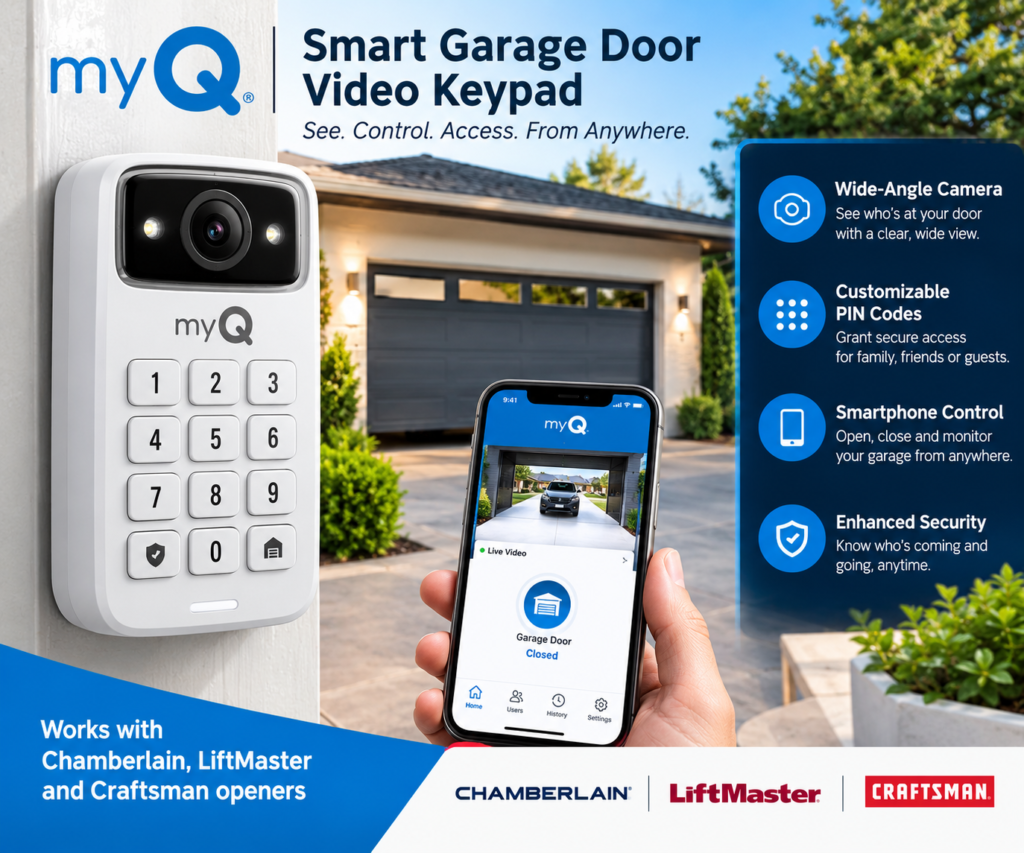
It can be a good choice for homeowners who want keypad access, individual PINs and garage video monitoring in one device, especially when they already own compatible equipment.
It is less attractive for buyers who only need a basic keypad or who specifically want local video storage without a subscription.
Final Verdict
The myQ Smart Garage Video Keypad is an interesting smart-home upgrade because it combines functions that are normally purchased separately.
Its biggest strength is the combination of:
- Keypad access
- Custom PIN codes
- Wide-angle video
- Motion detection
- Two-way audio
- Smartphone management
- myQ ecosystem integration
For a homeowner with a compatible Chamberlain, LiftMaster, Craftsman, Raynor or AccessMaster opener, this combination can make the product considerably more useful than a conventional garage keypad.
However, it is not perfect.
The rechargeable battery requires ongoing attention, Wi-Fi quality matters, compatibility must be checked, and users who want recorded video should understand the role of the myQ Video Monitoring subscription.
Bottom Line
Consider the myQ Smart Garage Video Keypad if you want keyless garage access plus video monitoring in one device.
Consider an alternative if you only need a simple keypad, want local video storage, or prefer a different smart-home ecosystem.
Because pricing, promotions and subscription options can change, check the current product information before purchasing.
Affiliate Disclosure
This article may contain affiliate links. If you purchase a product through one of these links, the publisher may receive a commission at no additional cost to you.
Affiliate relationships do not change the price you pay or the information presented in this article. Product features, compatibility, pricing and subscription terms can change, so readers should verify important details before purchasing.
related articles at digitalaff.com