Modern laptops are becoming thinner and more portable, but that often means fewer ports for connecting external monitors, USB accessories, and other devices. If your laptop has limited connectivity, you may need a simple way to connect more devices without carrying a large docking station.
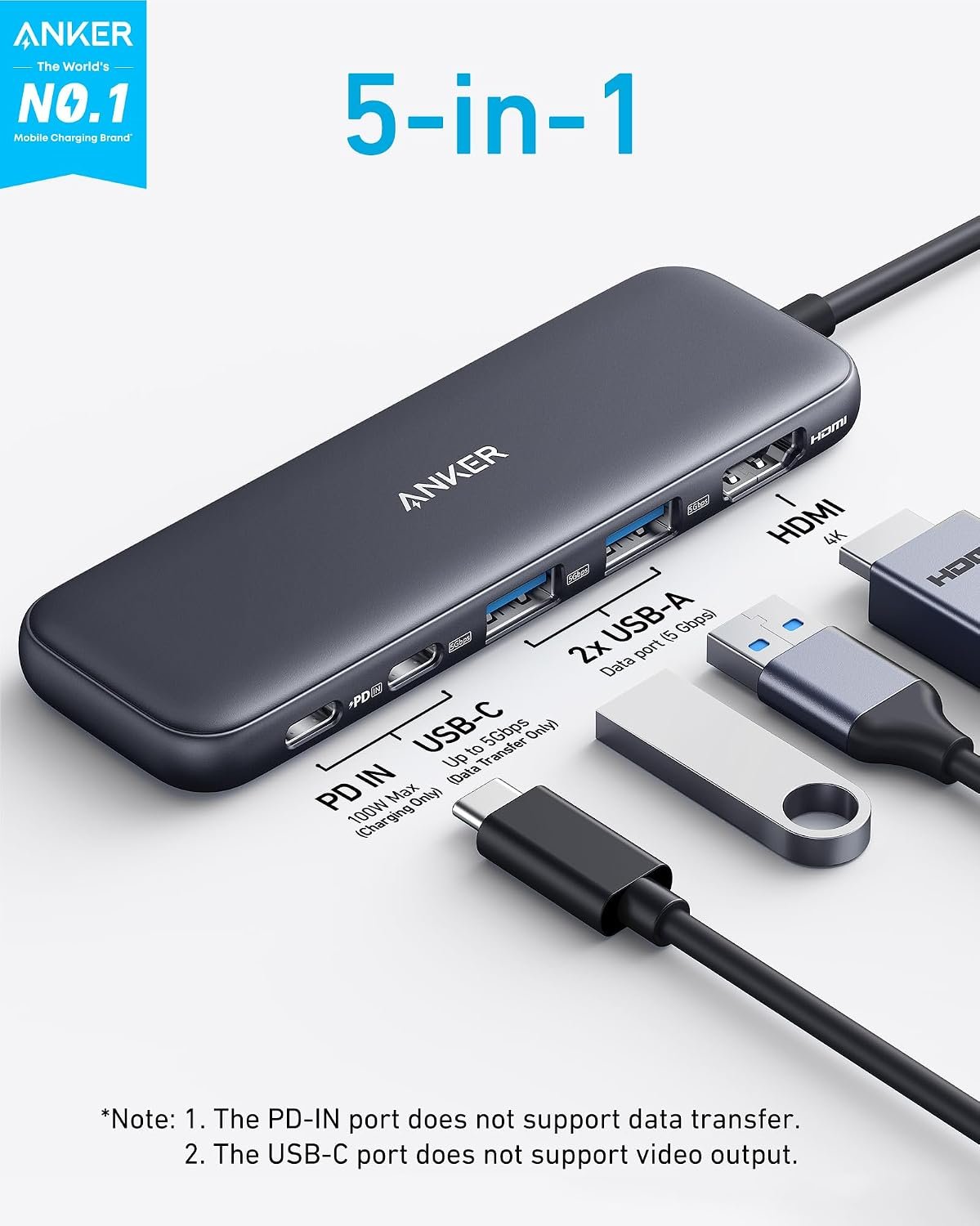
The Anker USB-C Hub 5-in-1 is designed to solve this problem by expanding a compatible USB-C port into multiple connections, including HDMI for an external display, USB ports for accessories, and a USB-C Power Delivery input for pass-through charging.
Whether you work from home, study, travel with a laptop, or need a more convenient desk setup, this compact hub may help simplify your everyday workflow.
In this review, we will explore its main features, 4K display support, charging capabilities, compatibility, advantages, limitations, and the things you should check before buying.
Quick Answer: Is the Anker USB-C Hub 5-in-1 Worth It?
The Anker USB-C Hub 5-in-1 is worth considering if you need a compact multiport adapter for connecting an external monitor, USB accessories, and a compatible laptop charger.
The Anker USB-C Hub 5-in-1 is a compact connectivity accessory that expands the capabilities of a compatible laptop’s USB-C port.
Instead of repeatedly disconnecting devices or relying on a single port, you can use the hub to connect an external display, compatible USB peripherals, and a power adapter.
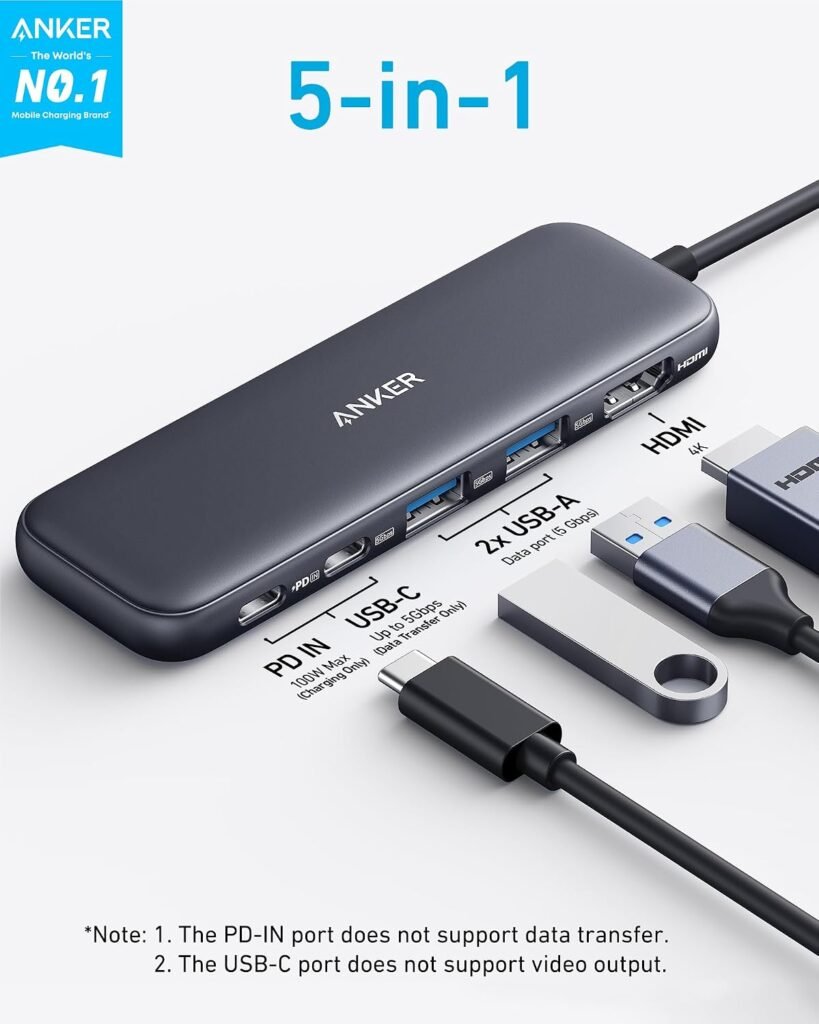
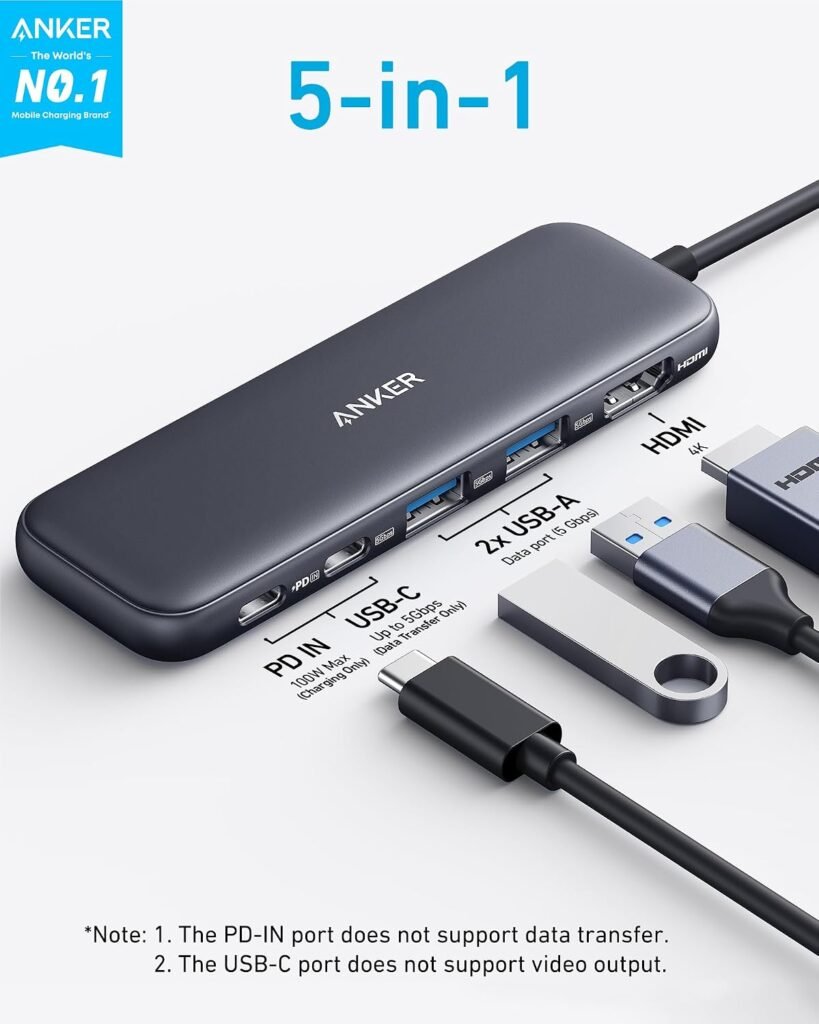
The five connections on the relevant model include:
- One HDMI port for an external display.
- One USB-A 3.0 port for compatible accessories and data transfer.
- Two USB-A 2.0 ports for compatible peripherals.
- One USB-C Power Delivery input for pass-through laptop charging.
These specifications correspond to Anker’s A8357 version of the 5-in-1 USB-C Hub. Check the exact model on the product listing because Anker sells multiple hubs with similar names and different port configurations.
The main purpose is straightforward: make a compatible laptop more convenient to use without adding a large docking station to your workspace.
Key Features of the Anker USB-C Hub 5-in-1
1. Five-in-One Connectivity
One of the biggest benefits of the Anker USB-C Hub 5-in-1 is its ability to provide several connection options through a single USB-C connection.
You can connect an external display through HDMI while using USB ports for compatible accessories such as a keyboard, mouse, flash drive, or other peripherals.
Why it matters: If your laptop has only a few available ports, a multiport hub can make it easier to organize your workspace and connect the accessories you use regularly.
The hub is particularly useful for people who move between different workspaces and prefer carrying one compact accessory instead of several individual adapters.
2. 4K HDMI Display Support
The HDMI port supports resolutions up to 4K at 30Hz on the relevant A8357 model.
This allows you to connect a compatible laptop to a 4K monitor or television for presentations, productivity, web browsing, and supported video playback.
Why it matters: An external monitor can give you more screen space for working with documents, spreadsheets, research, and multiple applications.
For example, you could keep a document open on your laptop while viewing reference material on an external monitor.
Keep in mind that 4K resolution at 30Hz is not the same as 4K at 60Hz. If you want smoother movement for gaming or high-refresh-rate desktop use, check whether another hub better matches your display requirements.
The hub includes a USB-C Power Delivery input that supports up to 90W pass-through charging when used with a compatible 100W power adapter.
This means you can connect a compatible charger to the hub while using its other ports, helping reduce the need to disconnect the hub whenever you need to charge your laptop.
An important detail is that the USB-C Power Delivery input is intended for charging. It is not a USB-C data port for connecting a flash drive, external storage device, or monitor.
The compatible wall charger is not included with the product.
Why it matters: Pass-through charging can be convenient for people who use an external monitor and USB accessories throughout the day.
Actual charging performance depends on the charger, laptop power requirements, connected devices, and other operating conditions.
4. USB Data Transfer up to 5Gbps
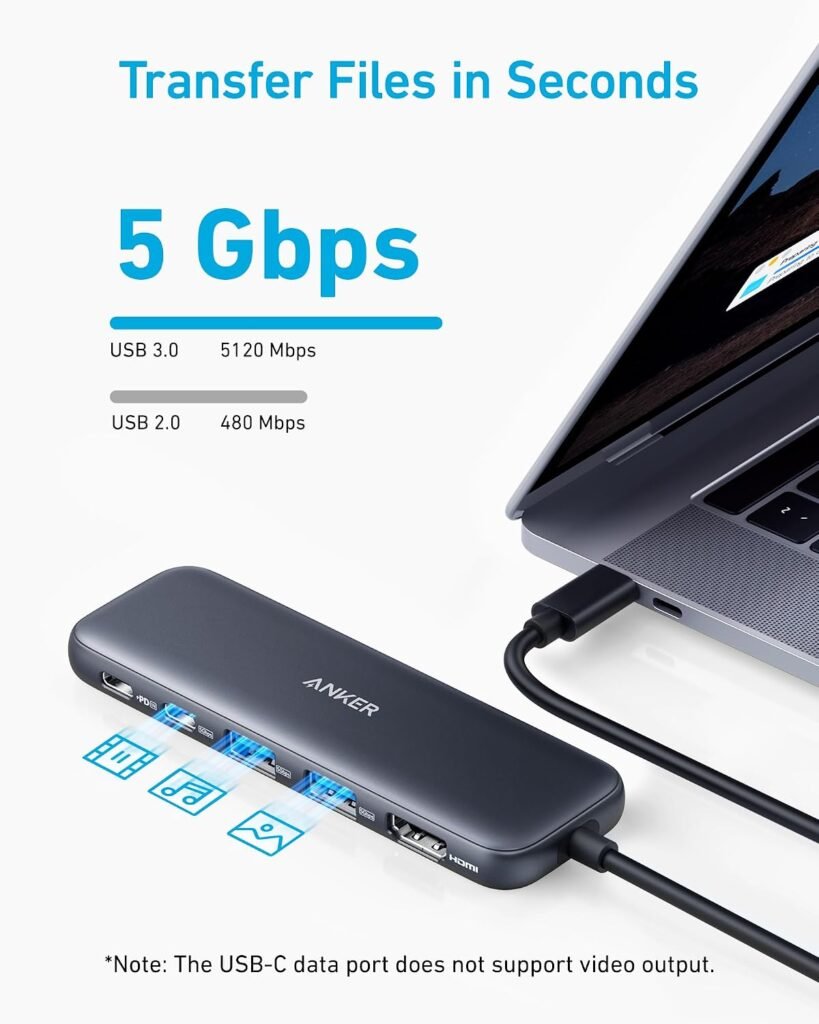
The USB 3.0 port supports data transfer speeds of up to 5Gbps under compatible conditions.
This can be useful when transferring files between a laptop and supported USB storage devices.
The two USB 2.0 ports support speeds of up to 480Mbps, making them more appropriate for compatible everyday peripherals such as keyboards and mice.
These are theoretical interface speeds, not guaranteed real-world file-transfer rates. Actual performance depends on the connected device, file sizes, system, and other factors.
Why it matters: Different USB ports have different capabilities. Understanding those differences helps you choose the right port for your accessories.
5. Compact and Travel-Friendly Design
A compact hub can be easier to carry than a full-size docking station.
For people who work in different locations, study outside the home, or regularly travel with a laptop, a smaller accessory can help keep a bag organized.
The hub is designed for everyday connectivity rather than replacing a complete desktop docking solution.
The following specifications refer to the Anker A8357 USB-C Hub (5-in-1, 4K HDMI). Verify the exact model number on your Amazon listing before purchasing.
| Specification | Details |
|---|---|
| Product type | USB-C multiport hub |
| Number of connections | 5 |
| HDMI output | Up to 4K at 30Hz |
| USB 3.0 data speed | Up to 5Gbps |
| USB 2.0 data speed | Up to 480Mbps |
| Power Delivery input | Up to 100W input |
| Laptop pass-through charging | Up to 90W |
| Wall charger included | No |
| HDMI video requirement | Compatible USB-C video output |
| Supported operating systems | Windows 10 or later, macOS 12 or later, ChromeOS, according to the A8357 guide |
Specifications can differ between similar Anker models. Always confirm the port configuration and supported features for the exact product you intend to buy.
How to Use the Anker USB-C Hub 5-in-1
Setting up a compatible hub is generally straightforward.
Step 1: Check Your Laptop’s USB-C Port
Before connecting the hub, confirm that your laptop has a compatible USB-C port.
For external video, the port must support DisplayPort Alt Mode or another supported USB-C video-output implementation. A USB-C connector alone does not guarantee that HDMI output will work.
Step 2: Connect the Hub
Plug the hub’s USB-C connector into your laptop.
Make sure the connector is properly seated and that the laptop recognizes the connected devices.
Step 3: Connect Your External Monitor
Use a compatible HDMI cable to connect the hub to your monitor or television.
Select the correct HDMI input on your display. If the screen does not appear, check the laptop’s display settings and video-output compatibility.
Step 4: Connect Your USB Accessories
Connect compatible accessories to the appropriate USB-A port.
Use the USB 3.0 port for devices that benefit from higher data-transfer speeds, such as compatible external storage.
Step 5: Connect Your Charger if Needed
If you want to charge your laptop while using the hub, connect a compatible USB-C Power Delivery charger to the hub’s PD input.
A compatible 100W charger can provide up to 90W of pass-through power to the laptop, subject to the setup’s requirements.
Benefits of the Anker USB-C Hub 5-in-1
A More Organized Workspace
The hub can reduce the need for several separate adapters, especially if your laptop has limited ports.
Easier External Monitor Connections
The HDMI port provides a practical option for connecting a compatible laptop to a larger display.
Convenient Laptop Charging
Pass-through charging allows you to keep a compatible laptop charger connected while using the hub.
Support for Everyday Accessories
The USB ports can accommodate compatible peripherals such as keyboards, mice, and USB storage devices.
Useful for Travel and Remote Work
Its compact format may appeal to students, remote workers, and people who move between home, school, and other workspaces.
Pros and Cons
Pros
- Five connections in one compact hub.
- HDMI output supports up to 4K at 30Hz.
- USB 3.0 data transfer up to 5Gbps.
- Two additional USB 2.0 ports.
- Up to 90W laptop pass-through charging with a compatible 100W charger.
- Can help reduce the need for multiple separate adapters.
- Useful for compatible home, office, and travel setups.
Cons
- The HDMI output requires compatible USB-C video support.
- The HDMI port is limited to 4K at 30Hz on the A8357 model.
- The charger is not included.
- The PD input is for charging, not USB data or video.
- The USB 2.0 ports are slower than the USB 3.0 port.
- It is not a full docking station with Ethernet, card readers, or multiple display outputs.
Who Should Buy the Anker USB-C Hub 5-in-1?
Students
Students who use compatible laptops can benefit from connecting a monitor, mouse, keyboard, or flash drive without constantly switching adapters.
Remote Workers
For people working from home, the hub can simplify connections between a laptop, external display, and everyday USB accessories.
Office Professionals
The HDMI output can be useful for presentations and for setting up an external monitor at a desk.
Frequent Travelers
People who work in different locations may appreciate a compact hub that combines several common connections in one accessory.
Laptop Users with Limited Ports
If your laptop has only one or two available USB-C ports, the hub may help expand your connectivity options.
Who Should Consider an Alternative?
This hub may not be the right choice if you need:
- Two or more independent external monitor outputs.
- 4K video at 60Hz.
- Built-in Ethernet connectivity.
- SD or microSD card readers.
- Several high-speed USB data ports.
- A full desktop docking station with a broader selection of connections.
In these situations, compare the exact specifications of a larger Anker hub or another compatible docking station before buying.
Anker USB-C Hub 5-in-1 vs a Full Docking Station
| Feature | Anker 5-in-1 Hub | Full Docking Station |
|---|---|---|
| Portability | Compact | Often larger |
| HDMI display | Up to 4K at 30Hz on A8357 | Depends on model |
| USB connectivity | Limited selection | Often more ports |
| Ethernet | Not included | Available on some models |
| Memory card reader | Not included | Available on some models |
| Best use | Everyday portable connectivity | More demanding desk setups |
| Typical setup | Laptop and essential accessories | Laptop, monitors, network and multiple peripherals |
The best choice depends on how many devices you need to connect and which display, charging, and data-transfer features matter most.
Compatibility: What to Check Before Buying
Compatibility is one of the most important considerations when buying a USB-C hub.
Before ordering, check the following:
Laptop port: Your laptop must have a suitable USB-C port. For HDMI video, the port must support compatible video output.
Operating system: Check the product’s current compatibility information and your computer’s requirements.
Monitor: Confirm the monitor’s HDMI input and desired resolution and refresh rate.
Charger: If you need pass-through charging, use a compatible USB-C Power Delivery charger. The hub’s 90W output specification does not mean that every laptop will draw 90W.
USB accessories: Check the requirements of any external drive or other accessory you plan to connect.
The official Anker documentation is the best place to confirm the specifications for your exact model.
Is the Anker USB-C Hub 5-in-1 Good for 4K Monitors?
It can be suitable for a compatible 4K monitor when 4K resolution at 30Hz meets your needs.
For office work, browsing, documents, and many everyday tasks, this may be sufficient.
However, users who prefer 4K at 60Hz should choose a hub specifically rated for that output. A higher display refresh rate can make cursor movement, scrolling, and supported video appear smoother.
Before purchasing, confirm the capabilities of your laptop’s USB-C port, the hub’s HDMI specification, and your monitor.
Does the Anker USB-C Hub 5-in-1 Support Fast Charging?
The A8357 model supports up to 90W pass-through charging when connected to a compatible 100W USB-C Power Delivery charger.
The actual charging speed depends on your laptop’s supported charging rate, the charger, and the devices connected to the hub.
Also remember that the wall charger is sold separately.
If charging performance is a major reason for buying this hub, check your laptop manufacturer’s power requirements and compare them with the hub’s specifications.
Price and Availability
The price of the Anker USB-C Hub 5-in-1 can change depending on the exact model, retailer, promotions, and availability.
Rather than relying on an old price, check the current Amazon listing to see the latest price, delivery details, and product specifications.
If you want to see the current listing and check whether the hub fits your setup, take a look at the Anker USB-C Hub 5-in-1 on Amazon.
Before ordering, make sure the listing matches the five-in-one model described in this article.
Frequently Asked Questions
1. What does an Anker USB-C Hub 5-in-1 do?
It expands a compatible laptop’s USB-C connection into multiple connections, including HDMI, USB data ports, and a USB-C Power Delivery input for pass-through charging.
2. Does the Anker USB-C Hub 5-in-1 support 4K?
Yes. The A8357 model supports HDMI output up to 4K at 30Hz, provided the connected laptop and display support the required video capabilities.
3. Can I use the hub to connect my laptop to a TV?
Yes, if the laptop’s USB-C port supports video output and the TV has a compatible HDMI input. You will also need a suitable HDMI cable.
4. Does the hub charge my laptop?
It supports pass-through charging through its USB-C PD input. With a compatible 100W charger, the A8357 model supports up to 90W pass-through power.
5. Does the Anker USB-C Hub 5-in-1 include a charger?
No. The compatible wall charger is not included, so you need to provide one if you want to use pass-through charging.
6. Can I connect a USB flash drive?
Yes. Compatible USB storage devices can be connected through the appropriate USB data port. Remember that the USB-C PD input is for charging only.
7. Will it work with a MacBook?
It can work with compatible MacBook models that support the required USB-C video and connectivity features. Verify the exact MacBook model and hub specifications before purchasing.
8. Will it work with a Windows laptop?
The A8357 documentation lists support for Windows 10 and later, but the laptop must also have a suitable USB-C port for the functions you want to use.
9. Is 4K at 30Hz good enough for everyday work?
It may be adequate for documents, browsing, and general productivity. If you want smoother display movement or specifically need 4K at 60Hz, choose a hub rated for that specification.
10. Can I connect two monitors to this hub?
The A8357 model has one HDMI output. If you need two independent external displays, look for a compatible hub or docking station designed to support your required multi-monitor setup.
11. Does the hub have an Ethernet port?
No. The A8357 model does not include Ethernet. If you need a wired network connection, compare it with a hub or docking station that includes an Ethernet port.
12. Is the Anker USB-C Hub 5-in-1 worth buying?
It is worth considering if you need a compact way to connect one external HDMI display, compatible USB accessories, and a laptop charger. It is less suitable if you need multiple monitor outputs, 4K at 60Hz, Ethernet, or a wider range of ports.
Final Verdict: Should You Buy the Anker USB-C Hub 5-in-1?
The Anker USB-C Hub 5-in-1 is a practical option for users who want to expand the connectivity of a compatible laptop without carrying a large docking station.
Its key strengths are the combination of HDMI display output, USB connectivity, and pass-through charging in a compact accessory.
The main limitations are equally important: the A8357 model’s HDMI output is rated for 4K at 30Hz, its USB ports have different transfer speeds, and the charger is not included.
For students, office professionals, remote workers, and travelers who need these specific connections, it is worth comparing against other hubs in the same category.
If you need multiple monitors, 4K at 60Hz, Ethernet, or card readers, a more fully equipped docking station may be a better fit.
Ready to check the product details? View the Anker USB-C Hub 5-in-1 on Amazon and confirm that the listed model matches your laptop and connectivity requirements.
Affiliate Disclosure
This article contains an affiliate link. If you purchase through the link, DigitalAff.com may earn a commission at no additional cost to you. This helps support the website and its product guides.
Product specifications, compatibility, prices, and availability can change. Always verify the latest information on the retailer’s listing and the manufacturer’s official documentation before purchasing.